Varlens - DSLR in Phone: A Comprehensive Review
Screenshots


Introduction
Varlens - DSLR in Phone is a professional camera application developed by Aura Marker Studio Co., Ltd., tailored for photography enthusiasts looking to elevate their smartphone photography experience to DSLR levels. With the latest version 3.2.5, Varlens combines advanced features typically found in high-end cameras with the convenience of mobile technology. This app boasts five distinct shooting modes—Auto, Time-lapse, Light Trail, Manual, and Program—allowing users to explore various styles of photography. Whether you are a beginner or an advanced photographer, Varlens offers tools for capturing stunning images with manual controls for ISO, shutter speed, and white balance, making it a versatile choice for all.
Graphics & Gameplay
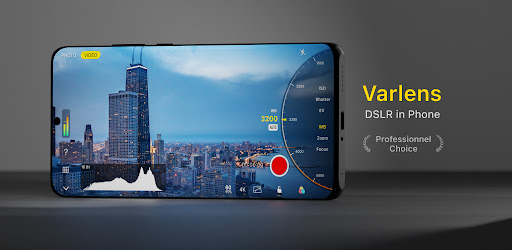
The graphical interface of Varlens is user-friendly yet sophisticated, showcasing a big UI designed for ease of use. The app's layout is intuitive, with clearly labeled functions that mimic professional camera settings. The screenshots reveal a sleek design where essential controls are easily accessible, ensuring that users can quickly adjust settings while focusing on capturing the perfect shot. The visuals are enhanced by a range of classic filters and analog presets that can be applied seamlessly during and after shooting. A robust editing suite allows for intricate post-processing, further enhancing the app's appeal. Overall, the graphics of Varlens strike a balance between professional aesthetics and practical usability.
Key Features
- Multiple Shooting Modes: Choose from Auto, Time-lapse, Light Trail, Manual, and Program modes to adapt to various shooting scenarios.
- Manual Controls: Enjoy full control over ISO, shutter speed, exposure value (EV), white balance, and focus, as well as multiple metering modes for precise photography.
- Advanced Grid and Level Tools: Utilize grid lines, histogram, zebra stripes, and focus peaking to enhance composition and exposure accuracy.
- Customizable Filters: Access a wide range of filters, including self-made options via importing 3DLUT files for personalized cinematic color grading.
- Professional Photo Editing: Features like HSL+ tool, exposure adjustments, and non-destructive editing allow for high-quality image processing.
- Artistic Photo Frames: Add creative frames that display camera details and EXIF parameters.
- Cinematic Video Recording: Capture videos with real-time color grading, slow-motion capabilities up to 120fps, and stereo sound recording.
- User-Friendly Interface: A left-hand interface and big UI elements cater to both left-handed users and those who prefer larger touch targets.
Mod Features
- Premium Unlocked: Gain access to all features without the need for in-app purchases, including advanced filters and editing tools.
- No Ads: Enjoy an uninterrupted photography experience with no advertisements distracting from your creative process.
- Unlimited Money: Use unlimited resources for purchasing premium filters, effects, and editing enhancements without restrictions.
- Exclusive Filters: Access limited-time exclusive filters that are not available in the standard version of the app.
- Advanced Editing Tools: Additional editing features that provide even more control over your images, including advanced color grading options.
How to Install APK on Android
Installing the Varlens APK on your Android device is a straightforward process. Follow these steps for a successful installation:
- First, ensure that your device allows installations from unknown sources. Go to Settings > Security, and toggle on Unknown Sources.
- Download the Varlens APK file from a reliable source. You can use the original URL: here.
- Once the download is complete, navigate to your device's Downloads folder.
- Tap on the Varlens APK file to initiate the installation process.
- Follow the on-screen prompts to complete the installation.
- After installation, locate the Varlens app in your app drawer and launch it to start capturing stunning photos!
Conclusion
Varlens - DSLR in Phone stands out as an exceptional application for anyone serious about mobile photography. With its comprehensive set of features, from advanced shooting modes to powerful editing capabilities, it caters to both novice and seasoned photographers alike. The intuitive interface and professional-grade tools make it a must-have for anyone looking to elevate their smartphone photography game. Don't miss the opportunity to transform your phone into a powerful photography tool!
Download Varlens now and start capturing amazing images! Visit the link provided to get started on your photography journey today.